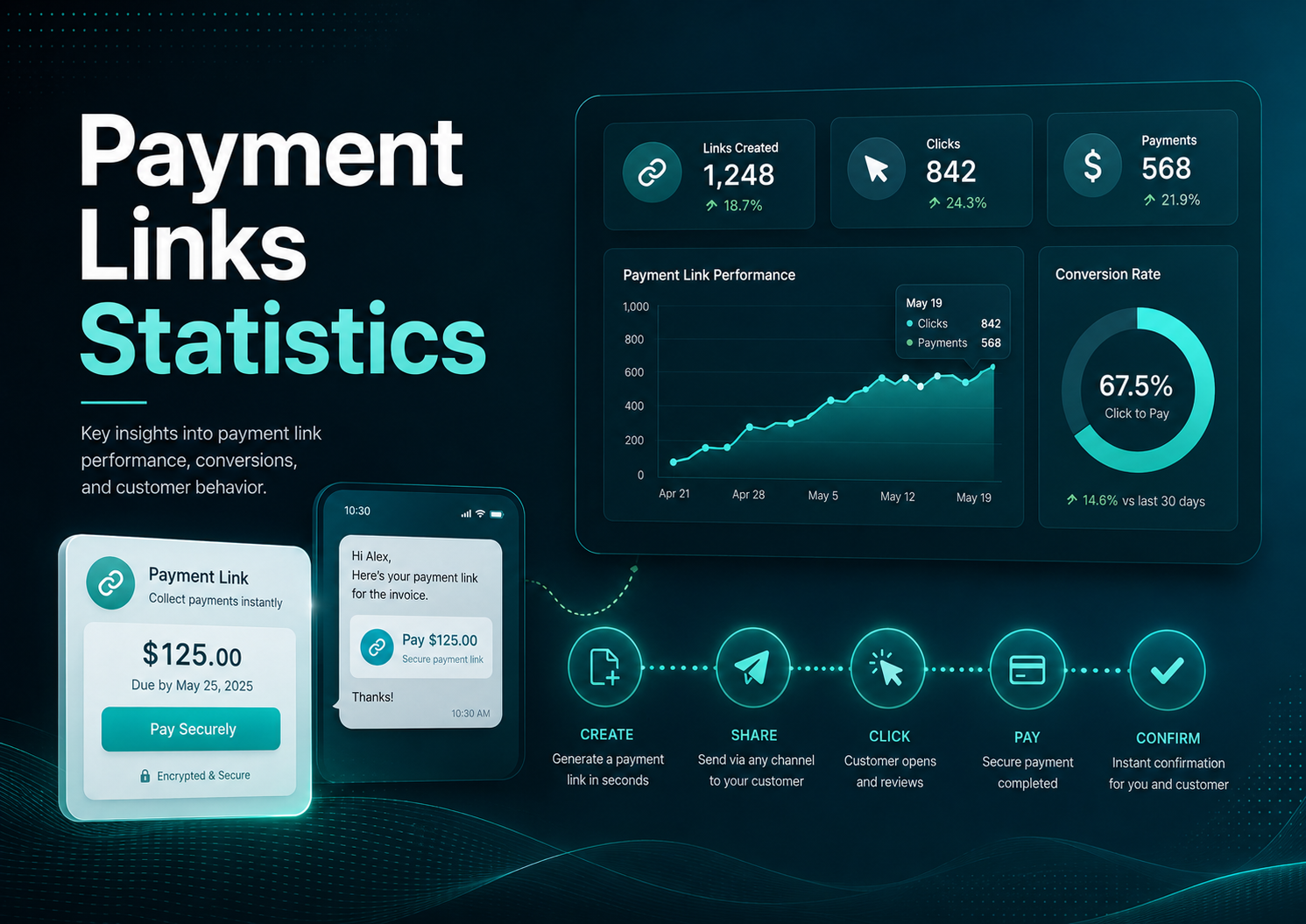
Payment links are one of the simplest payment tools a business can send, but the statistics behind them point to a much larger operating issue. A link can turn an invoice, quote, reminder, QR code, SMS, email, or chat message into a direct payment path. That matters because many customers are not refusing to pay; they are waiting for an approval, searching for instructions, opening the invoice on a phone, asking for a copy, or postponing a task that is harder than it should be.
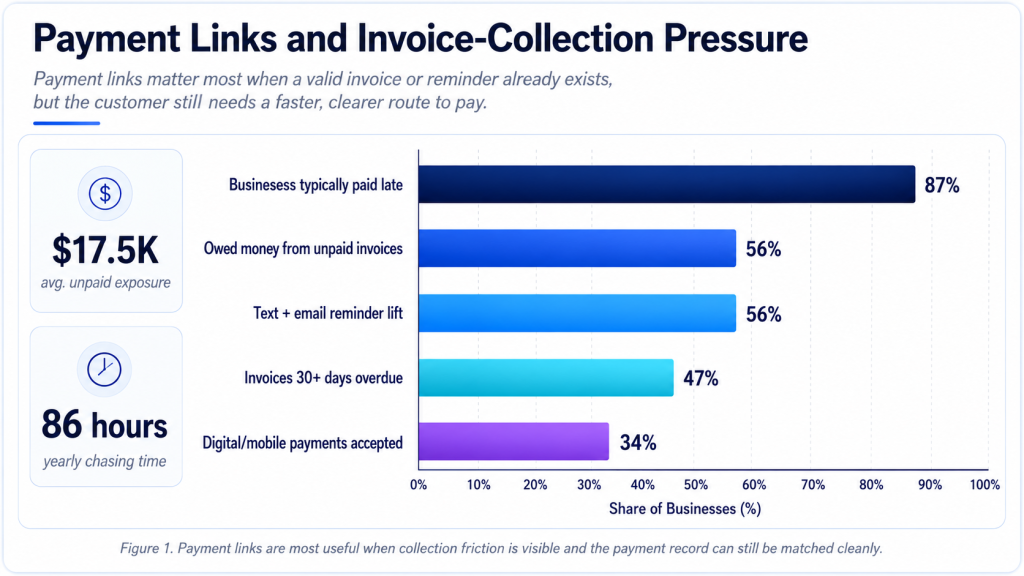
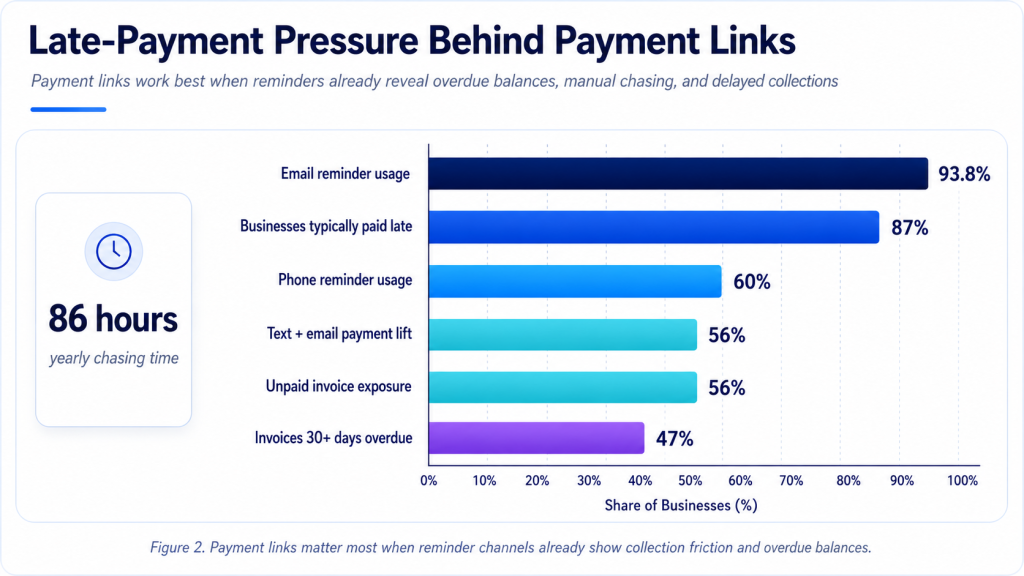
The strongest payment-link benchmarks come from the surrounding payment environment. QuickBooks reports that 56% of surveyed U.S. small businesses are owed money from unpaid invoices, while 47% have invoices more than 30 days overdue. Chaser reports a typical late-payment rate of 87% in its late-payment research, and the U.K. Small Business Commissioner estimates that affected firms spend an average of 86 hours per year chasing late invoices. Those numbers explain why a shorter payment path can matter even when it looks like a small product feature.
Payment links work best as a practical collection layer, not as a payment-provider feature list. Strong link workflows can reduce invoice friction, improve reminder performance, support mobile payment behavior, localize payment rails, and give businesses cleaner records after money moves. A payment link is useful only when it helps the customer pay and helps the business understand what was paid, by whom, through which method, and against which invoice, job, quote, subscription, or balance.
The market context reinforces that point. The research workbook includes payment-link market estimates of $8.4 billion in 2025 and a projected $24.7 billion by 2034, plus a separate no-code checkout estimate that rises from $4.82 billion in 2025 to $16.7 billion by 2034. Those forecasts should be read carefully because market-sizing definitions vary, but they capture the same operating trend: more businesses want payment collection that can be launched from an invoice, message, QR code, quote, or hosted page without rebuilding a full ecommerce stack.
That is why traceability matters throughout the payment-link workflow. A link that collects money but leaves the owner guessing which invoice was paid is only half a solution. A better payment-link system carries the invoice number, customer record, amount, payment method, settlement status, fee detail, and reconciliation reference through the workflow.
Executive Payment Link Benchmarks
The headline data shows why payment links belong in the same conversation as invoice collection, small-business cash flow, mobile payment, and AR automation. The numbers do not prove that a link alone solves late payment. They show that payment requests often fail because the next step is unclear, inconvenient, slow, or disconnected from the customer’s preferred payment method.
• QuickBooks reports that 56% of surveyed U.S. small businesses were owed money from unpaid invoices, making invoice collection a mainstream payment problem rather than an occasional exception.
• Among affected U.S. firms, the average unpaid invoice exposure reached about $17,500, enough to affect payroll, supplier bills, inventory, owner pay, or credit-line usage for many smaller businesses.
• The same QuickBooks research found 47% of surveyed U.S. small businesses had invoices more than 30 days overdue, while the average 30+ day share was 10% of invoices.
• Chaser reported businesses were typically paid late at a rate of 87%, which explains why reminders and payment links should be treated as routine collection infrastructure.
• Email remained the dominant reminder channel in Chaser data at 93.8%, but phone calls still appeared in 60% of reminder activity, showing that links often work inside a broader follow-up system.
• Chaser found that text plus email reminders increased the chance of payment within one week of the due date by 56%, a useful signal for SMS payment links and multichannel follow-up.
• Federal Reserve small-business payment research found checks accepted by 80% of employer firms, credit cards by 74%, ACH by 56%, and digital or mobile payments by 34%.
• For invoice-led firms paid after delivery, check acceptance reached 95%, while ACH acceptance reached 51%, showing why links must often coexist with legacy payment behavior.
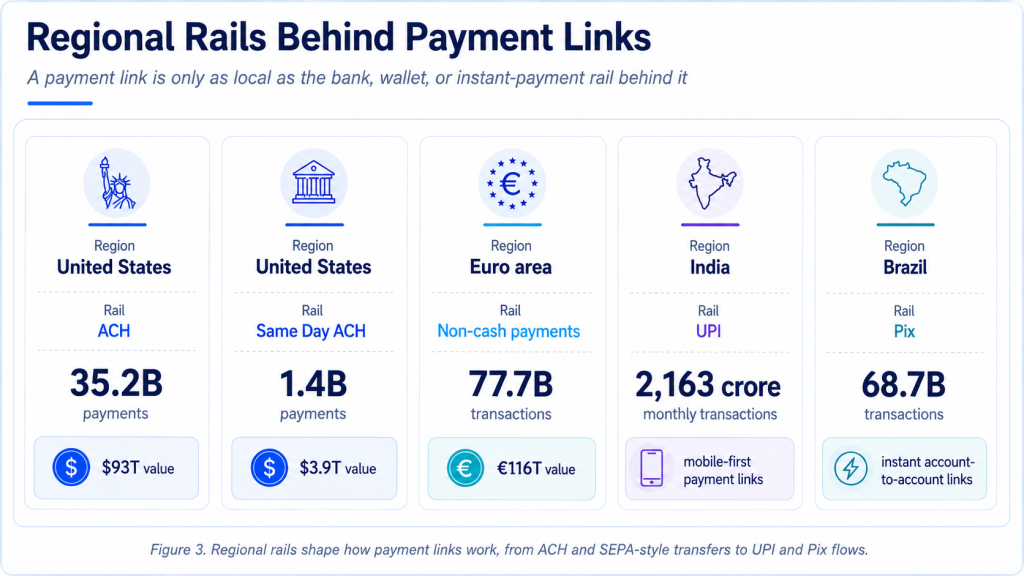
• Nacha reported 35.2 billion ACH payments worth $93 trillion in 2025, including 1.4 billion Same Day ACH payments worth $3.9 trillion.
• The euro area recorded 77.7 billion non-cash payment transactions worth EUR 116.0 trillion in H1 2025, with cards representing 57% of transaction count.
• India’s UPI crossed 2,000 crore monthly transactions in August 2025 and reached 2,163 crore transactions in December, making payment-link and QR flows core infrastructure in India-facing payment design.
• Brazil’s Pix processed 68.7 billion transactions in 2024, with transaction growth of 52% year over year and person-to-business Pix growth of 90%.
• Stripe reported more than 100,000 businesses using Payment Links across 40+ countries in an earlier product update, showing that no-code payment collection had already moved beyond a niche feature.
• Provider fee examples also matter: Square lists standard ecommerce payment-link pricing at 3.3% plus $0.30 for new U.S. customers, while its Afterpay link fee is listed at 6.0% plus $0.30, reminding businesses that link convenience still needs margin review.
• PayPal, Stripe, Square, and Razorpay all position payment links as low-code or no-code payment tools, which is important for small businesses that need collection speed before they have a full checkout, portal, or custom integration.
Editorial readout Payment links are strongest when the buyer already has intent but the payment path creates delay. The link should reduce the number of steps between invoice, reminder, quote, or message and a completed, traceable payment. It should also preserve context so the business can reconcile the money without another round of manual work.
What Payment Links Actually Solve
A payment link is not the same as a payment method. It is a distribution format for a payment request. The method behind the link may be card, wallet, ACH, bank transfer, UPI, Pix, Faster Payments, BNPL, or another local rail. The link itself solves a different problem: it gives the customer a direct route from a message, invoice, quote, QR code, or reminder to a payment page or payment app.
That makes payment links valuable in situations where a business does not need a full ecommerce cart. A consultant can send a link with an invoice. A contractor can request a deposit after an estimate is approved. A clinic can text a balance link after an appointment. A repair shop can place a QR code at the counter. A wholesaler can send a statement link to a customer with several open invoices. A creator or small seller can share a no-code checkout link without building a storefront.
The most important distinction is context. A generic link that simply asks for money may collect funds, but it can create reconciliation work if the payment is not tied to an invoice, customer, job, deposit, or account. A stronger payment link carries enough information to answer the back-office question: what did this money close?
The strongest payment-link programs therefore begin with the payment moment. A quote link should support deposit collection and job scheduling. An invoice link should support the exact balance due and the invoice reference. A reminder link should respect whether the invoice is pre-due, due today, or already overdue. A QR link should reassure the customer that the destination is legitimate. A recurring setup link should make authorization and future billing clear before the first payment is collected.
This is also why payment links should not be measured only by the number of links sent. A business can send hundreds of links and still have weak collection if customers do not open them, if the mobile checkout is clumsy, if the wrong payment method is missing, or if the accounting team still has to match deposits manually. The useful question is whether the link moved a specific payment request closer to approved, settled, and reconciled cash.
| Payment-link job | Where it appears | What it should preserve |
|---|---|---|
| Invoice payment | PDF invoice, online invoice, email, portal, reminder | Invoice number, customer, amount, due date, and payment status |
| Quote or estimate deposit | Approved estimate, booking message, project proposal | Deposit amount, job reference, remaining balance, and acceptance record |
| Reminder payment | Pre-due email, overdue email, SMS, account note | Invoice age, reminder history, payment commitment, and contact record |
| QR payment | Counter display, delivery note, service visit, printed invoice | Amount due, business identity, method, receipt, and settlement record |
| Recurring setup | Subscription, retainer, membership, installment plan | Authorization, schedule, retry logic, customer consent, and update path |
| Statement payment | Customer portal or monthly statement | Multiple invoices, credits, partial payments, and remittance detail |
Payment Links and Invoice Collection
Invoice collection is the most natural home for payment links because the payment request already exists. The customer has received a document, balance, due date, and explanation of what was sold. The missing step is often the route to pay. If the customer has to request bank details, find a portal login, print a check, copy card information into a separate site, or ask which invoice number to reference, the invoice-to-cash path becomes longer than necessary.
The invoice-payment statistics show why this matters. QuickBooks found that 56% of U.S. small businesses had money owed from unpaid invoices, and Xero’s five-country invoice data showed average time-to-paid ranging from 23.8 days in New Zealand to 29.8 days in Canada. Late payment sits on top of that wait: Xero’s country figures showed invoices paid 9.0 days late in the United States, 8.2 days late in the United Kingdom, 6.9 days late in Australia, 4.5 days late in New Zealand, and 11.6 days late in Canada.
A payment link cannot approve an invoice inside the buyer’s organization. It cannot resolve a dispute or create budget where none exists. But it can remove the payment-action barrier after the invoice is approved. That is the difference between a customer who intends to pay and a customer who can pay immediately from the same email, Invoice PDF, text message, or portal view.
• A pay-now link on the invoice can reduce friction for customers who are willing to pay but do not want to search for bank details or a portal login.
• A reminder link can shorten the gap between a due-date nudge and actual payment, especially when the customer opens the reminder on a phone.
• A statement link can help customers pay multiple invoices at once instead of receiving one link per invoice and creating remittance confusion.
• A partial-payment link can keep undisputed cash moving while a smaller issue is reviewed, but it needs clear invoice status so the remaining balance is not lost.
• A deposit link can help service firms move from quote approval to scheduled work without waiting for a separate payment conversation.
• A well-designed link should carry invoice context into the payment record so the business does not collect money and then manually guess where to apply it.
A mature invoice-link setup usually has three levels. The first level is a simple pay-now URL that helps a customer submit a card or bank payment. The second level ties that link to the invoice record so amount, due date, invoice number, and customer details are prefilled. The third level connects the payment result to settlement and accounting data so the invoice can move from open to paid without a separate manual search.
That third level is where payment links become more than convenience. Versapay’s invoice-volume data in the research base, with median monthly volumes around 1,850 invoices for mid-market businesses and 2,450 invoices for larger revenue groups, shows why even a small mismatch rate can create meaningful manual work. At higher invoice volumes, a payment link that lacks strong references can move money faster while still leaving AR with the same posting problem.
| Invoice problem | How payment links help | Metric to track |
|---|---|---|
| Customer cannot find how to pay | Provide a direct pay-now path from the invoice or message | Click-to-payment rate |
| Approved invoice remains unpaid | Add a due-date or overdue link that reduces the next action to one tap | Reminder-to-payment conversion |
| Multiple invoices are open | Use statement or portal links that let the customer select balances | Multi-invoice payment completion |
| Payment arrives without context | Tie the link to invoice number, customer, and job record | Reconciliation match rate |
| Customer wants to dispute one line | Support partial payment or dispute routing instead of freezing the whole balance | Partial-payment and dispute-resolution rate |
Payment Links, Reminders, and Late-Payment Recovery
Payment reminders are often written as messages, but they should also be designed as actions. A reminder that says “please pay” still leaves the customer to decide how to pay. A reminder with a clear, trusted payment link makes the next step obvious. That is why payment links and reminder performance belong together.
Chaser’s reminder data gives the clearest signal. Email appeared in 93.8% of late-payment follow-up, phone calls appeared in 60%, and text plus email reminders increased the chance of payment within one week of the due date by 56%. Those statistics do not mean every invoice should receive every channel. They show that reminders work better when they reach the customer in a place where action is easy.
The strongest reminder link is not always the most aggressive one. A pre-due link confirms receipt and makes payment convenient. A due-date link helps the customer pay without searching. A post-due link asks for payment or a payment date. A 30-day overdue link may need a firmer message and an escalation owner. If the invoice is disputed, another link is not enough; the workflow needs a dispute path.
Payment links also make reminder testing more measurable. A business can compare pre-due link clicks, due-date link payments, seven-day-overdue payments, SMS link response, email link response, and phone-follow-up recovery. That evidence helps the team separate a copy problem from a payment-friction problem. If customers click but do not complete payment, the issue may be trust, method availability, mobile checkout, surcharge display, or card decline rather than reminder wording.
The strongest reminder workflow should also stop when the status changes. If the customer pays, the reminder should not continue. If the customer disputes the invoice, the next message should route them to resolution rather than another payment page. If the payment fails, the workflow should ask whether the failure was a decline, expired link, authentication problem, missing local method, or customer abandonment.
| Reminder stage | Payment-link role | Best measurement |
|---|---|---|
| Before due date | Confirm invoice receipt and provide an easy payment route | Pre-due payment rate and receipt confirmation |
| On due date | Make payment immediate with amount, due date, and method options visible | Due-date completion rate |
| 7-14 days overdue | Ask for payment date and include a direct link if no blocker exists | Reminder response and payment conversion |
| 30+ days overdue | Escalate ownership while keeping a clear payment path available | Aging-bucket recovery and broken promises |
| Disputed invoice | Route the customer to issue resolution rather than only payment | Dispute closure and undisputed balance collection |
Small-Business Payment Link Adoption
Small businesses often need payment links because their payment environment is mixed. Federal Reserve research found checks accepted by 80% of employer firms, credit cards by 74%, cash by 65%, debit cards by 58%, ACH by 56%, and digital or mobile payments by 34%. That is not a clean digital-only environment. It is a practical operating stack where customers pay in different ways depending on the job, invoice, channel, and relationship.
Payment links fit this environment because they do not force every business into a full ecommerce build. A local services company can accept card or ACH through a link. A professional firm can add a link to invoice emails. A contractor can send a deposit link after a quote is approved. A small retailer can use a QR link for special orders. A clinic or appointment business can collect balances after service without building a shopping cart.
The key is not simply offering a link. The business has to decide which link belongs to which payment moment. A point-of-sale customer may need a QR code or card wallet. An invoice customer may need ACH, card, or bank transfer. A recurring customer may need a setup link for authorization. A high-value B2B customer may need remittance detail and payment approval context more than a fast button.
The fee question should stay visible. Payment links can make collection easier, but the business still needs to know whether the link is routing customers to cards, ACH, wallets, BNPL, or another method. A fast card payment may be worth the fee when it prevents chasing, while ACH may be better for larger recurring invoices where bank payment is familiar and reconciliation is clean.
• Among firms paid in full at sale, card acceptance reaches 93%, which makes card-enabled links and QR flows relevant for customer-facing businesses.
• Among businesses paid after delivery or by invoice, check acceptance rises to 95%, proving that payment links often need to coexist with customers who still expect traditional methods.
• ACH acceptance reaches 51% among invoice-after-delivery businesses, creating a practical bank-payment option behind invoice links.
• Set-schedule service firms show 66% ACH acceptance, a useful signal for recurring payment setup links and scheduled invoices.
• Third-party payment arrangements show ACH acceptance at 80%, which matters for businesses dealing with reimbursement, financing, insurance, or intermediary settlement.
Payment Links and Mobile-First Payment Behavior
Payment links are especially useful on phones because the link can move through the channels customers already use: SMS, email, messaging apps, QR codes, mobile invoices, appointment reminders, and customer portals. But the link is only the beginning. If the hosted payment page is slow, not wallet-enabled, hard to read, or difficult to authenticate, the mobile advantage disappears.
Worldpay reports that smartphones grew from 19% of global ecommerce spend in 2014 to 57% in 2024, while digital wallets reached 53% of global ecommerce payment value. Bank of Canada research shows online purchases at 23% of all Canadian purchases in 2024, with mobile payments approaching 5%. Those figures show why payment links should be tested as mobile journeys rather than desktop forms.
A mobile payment link should answer five questions quickly: does the customer recognize the business, is the amount correct, is the payment method familiar, does authentication work, and does the customer receive confirmation? If any of those steps fail, the link may create suspicion instead of convenience.
• SMS links are useful for reminders because the customer can move from notification to payment without opening a separate portal.
• QR links work well when the customer is physically present, reviewing a printed invoice, or scanning from a service counter, receipt, sign, or delivery note.
• Wallet-enabled links can reduce mobile typing, but the business should still review authorization, refund, and reconciliation results by wallet and card type.
• Mobile links need clear branding because customers are more cautious when a payment request arrives through text or chat.
• A link that opens a payment page but requires too many fields can reproduce the same checkout friction the link was supposed to remove.
Regional Payment Link Intelligence
Regional statistics are essential because a payment link does not behave the same way in every market. The link may look simple, but the payment method behind it depends on local habits, rails, authentication rules, bank behavior, wallet adoption, and trust. A card link may work well in one country. A bank-transfer link, UPI link, Pix QR flow, Faster Payments path, or SEPA transfer may be more natural somewhere else.
United States
The U.S. payment-link story sits between cards, ACH, invoice links, and small-business payment needs. Cards remain familiar for many customers, but ACH gives invoice-led and recurring businesses a bank-based path. Nacha’s 2025 data reported 35.2 billion ACH payments worth $93 trillion, with Same Day ACH reaching 1.4 billion payments and $3.9 trillion in value. For payment links, that means ACH should not be treated as a back-office-only rail; it can be part of invoice links, recurring authorization, and larger B2B balances.
For U.S. invoice and service businesses, the strongest payment-link opportunity is often a blended setup: cards for immediate convenience, ACH for larger or recurring invoices, and Same Day ACH where timing matters. Nacha’s 35.2 billion ACH payments and $93 trillion in network value give bank-based links a large operating foundation, while 8.08 billion B2B ACH payments worth $63.11 trillion show why invoice-style links should not be designed as card-only tools.
Canada
Canada should not be copied from a U.S. payment plan. Bank of Canada research shows online purchases at 23% of all Canadian purchases and mobile payments approaching 5% in 2024. Canadian payment links should therefore be evaluated by remote purchase behavior, mobile readiness, card expectations, and local payment habits. A business selling into Canada should measure link completion separately rather than assuming the same card, wallet, and bank-transfer behavior as U.S. customers.
The Canadian data points to a different link-design problem: online purchasing is common, but mobile payments still represent a much smaller share of purchases. That gap means a Canadian payment link should be tested on both desktop and mobile rather than assuming a mobile-first path will perform the same way for every customer segment. Contactless behavior, online purchase habits, and card trust may all shape how quickly customers complete a link.
United Kingdom
The U.K. is a strong market for card payments, remote banking, and Faster Payments familiarity. UK Finance counted 48.8 billion payments in 2024 and reported debit cards at 26.1 billion payments. For payment links, the business question is not only whether a card form is available. The link may need to support card payment, pay-by-bank, open-banking flows, Direct Debit setup, or bank transfer depending on the invoice, subscription, service balance, or customer relationship.
The U.K. payment-link implication is that card links, mobile-wallet links, and bank-payment links can all be relevant in different contexts. UK Finance data showing 64% of payments by card, 18.9 billion contactless card payments, and 57% of adults registered for mobile payment services supports simple card and wallet experiences, while Faster Payments familiarity makes pay-by-bank and invoice-payment links worth testing where customers expect quick bank movement.
Euro Area and Europe
Euro-area data shows why European payment links need more than one method. The ECB reported 77.7 billion non-cash payment transactions worth EUR 116.0 trillion in H1 2025. Cards represented 57% of transaction count, while credit transfers represented most non-cash payment value. That means a payment link for a low-value consumer purchase may prioritize cards or wallets, while a link for a larger invoice, subscription, or B2B balance may need bank-transfer logic, SEPA context, instant transfer options, and clean remittance.
Country detail matters inside Europe. The euro area overall recorded 77.7 billion non-cash transactions in H1 2025, but the mix is uneven: cards represented 57% of transaction count, credit transfers represented 92% of non-cash value, Germany showed a relatively high direct-debit share, and Portugal had especially high card share. A European payment link should therefore adapt by market rather than presenting one generic card-first page everywhere.
India
India is the clearest example of payment links and QR flows becoming core infrastructure. UPI crossed 2,000 crore monthly transactions in August 2025 and reached 2,163 crore transactions in December. For India-facing payment links, UPI is not a small alternative method. It can be the expected path for customers who already use QR codes, payment handles, bank-linked apps, and instant confirmation in daily payment life.
The operational lesson for India-facing payment links is that UPI should often be treated as the default action path. UPI’s 2,163 crore December 2025 transactions and 28 lakh crore rupees in monthly value show enormous usage depth, while the research base also places digital payments at 99.8% of transaction volume in H1 2025. A link or QR flow that hides UPI behind less familiar options may create avoidable friction.
Brazil and Latin America
Brazil’s Pix shows how a domestic rail can reshape payment links. Pix processed 68.7 billion transactions in 2024, grew 52% year over year, and saw person-to-business Pix volume grow 90%. Worldpay data also shows Pix-linked A2A ecommerce value rising sharply from 2020 to 2024. For payment links, Pix can support QR payment, remote links, invoice payment, service balances, and business settlement, but the business still needs refund, reconciliation, and fraud controls.
Brazil is the clearest case where a payment link and a domestic instant rail can reinforce each other. Pix processed 68.7 billion transactions in 2024 and reached about $5 trillion in value, while person-to-business Pix grew 90% year over year. For payment links, that means Pix is not just a checkout alternative; it can support invoice links, QR codes, recurring authorization, service balances, and high-value B2B settlement when reconciliation is handled cleanly.
China and APAC
China and several APAC markets remind businesses that the payment link may need to open into wallet-first behavior. Worldpay reports digital wallets representing more than 80% of ecommerce transaction value in China. In wallet-led markets, a payment link that asks customers to manually enter card details may feel outdated or unfamiliar. Local wallet support, QR behavior, mobile confirmation, and provider coverage become part of the link’s conversion quality.
For wallet-heavy APAC markets, the payment link has to open into the method customers already trust. In markets where wallets or QR payment are the everyday behavior, a hosted link that forces unfamiliar card entry can feel less local even if it technically accepts payment. The regional lesson is to design the link destination around customer habit, not around the merchant’s default payment method.
| Region or country | Payment-link implication |
|---|---|
| United States | Support cards, ACH, Same Day ACH, recurring setup, and invoice payment links. |
| Canada | Measure Canadian online and mobile payment behavior separately from U.S. assumptions. |
| United Kingdom | Consider cards, Faster Payments, Direct Debit, open banking, and pay-by-bank links. |
| Euro area | Support cards, SEPA-style transfers, instant transfers, and country-specific bank behavior. |
| India | Treat UPI links and QR flows as core payment infrastructure. |
| Brazil | Use Pix links and QR flows for fast confirmation, consumer payment, and selected B2B use cases. |
| China / APAC | Plan for wallet-first and QR-heavy behavior where local apps dominate payment expectations. |
Payment Links, QR Codes, and No-Code Checkout
Payment links are often described as no-code checkout because they let a business accept payment without building a storefront, cart, or custom checkout page. That is useful for small businesses, service providers, creators, event organizers, appointment businesses, and B2B sellers that need a payment request more than a retail shopping experience.
QR codes extend the same idea into physical space. A QR payment link can appear on a printed invoice, counter sign, delivery note, estimate, repair order, restaurant bill, appointment reminder, or event poster. The customer scans, reviews the amount, chooses a method, and receives confirmation. The business gets a digital payment record that can be matched to the transaction if the link was generated correctly.
The risk is that easy link creation can create messy records. If staff members manually create links with inconsistent descriptions, wrong amounts, missing invoice numbers, or no customer reference, the payment may arrive but the back office still has to investigate. A no-code payment path should still have structured records behind it.
• A quote link should connect to an estimate, deposit, and remaining balance so the business can see whether the job has moved from proposed to scheduled.
• A QR code link should be branded clearly because customers scanning from a physical location need to trust that the destination belongs to the business.
• A social-selling link should still create a receipt, order record, and refund path rather than functioning as an informal money request.
• A payment link used by field staff should prevent manual amount errors by pulling the balance from the invoice, work order, or customer account.
• A no-code checkout link should be reviewed for fee, tax, receipt, refund, and reconciliation behavior before it is used at scale.
Payment Method Coverage Behind the Link
The customer does not pay with a link alone. The customer pays with the method behind the link. That method may be a card, wallet, ACH debit, bank transfer, UPI, Pix, open-banking payment, BNPL plan, or stored recurring authorization. The link only works well when it opens a familiar, trusted, low-friction method for the customer’s situation.
Broader online-payment data shows why payment method behavior varies widely by country and use case. For payment links, the important point is narrower: a payment-link workflow should not stop at “send link.” The business should decide which methods appear after the click, which method is default, which methods are available by country, which methods fit the invoice size, and which methods reconcile cleanly after settlement.
Card links are often easiest for customers but may carry processing fees and chargeback exposure. ACH links can fit invoice and recurring payment but need authorization and return handling. UPI and Pix links can fit markets where instant bank-linked behavior is normal. Wallet links can reduce mobile typing. BNPL links may improve affordability but should be reviewed with fees, refunds, disputes, and customer quality.
A useful payment-link page should also avoid choice overload. The goal is not to show every method a provider can technically support. The goal is to show the most trusted methods for that customer, amount, country, and device. A domestic customer paying a small deposit may need a wallet or card. A B2B customer paying a large invoice may prefer ACH, bank transfer, UPI, Pix, or pay-by-bank. A recurring customer may need authorization clarity more than a long method list.
Payment choice is also a conversion issue. Adyen’s 2025 retail research in the workbook says 51% of shoppers may leave if they cannot use a preferred method. For payment links, the equivalent risk is quiet nonpayment: the customer opens the link, does not see the method they trust, and decides to deal with it later. That delayed action can look like a reminder problem when the real issue is method fit.
| Payment method behind the link | Best fit | What to measure |
|---|---|---|
| Cards | One-time invoices, service balances, ecommerce-style links, deposits | Authorization, fee, chargeback, refund, and completion rate |
| ACH / bank debit | Recurring invoices, B2B balances, larger service payments | Authorization, returns, settlement timing, and reconciliation |
| Wallets | Mobile customers and repeat buyers | Mobile completion, authorization, refund, and support contacts |
| UPI | India-facing mobile, QR, invoice, and service payments | Completion, bank response, failed attempts, and confirmation time |
| Pix | Brazil checkout, QR, invoice, P2B, and selected B2B flows | Instant confirmation, refund flow, settlement, and matching |
| Pay by bank / open banking | Markets where bank-authenticated payment is familiar | Authentication success, abandonment, cost, and support workload |
| BNPL | Higher-ticket consumer purchases where financing is expected | Order value, fees, returns, disputes, and repeat behavior |
Payment Links and Reconciliation
A payment link should not only collect money. It should make the payment easier to apply. That is especially important for invoice businesses because a deposit into the bank account is not fully useful until the business knows which customer, invoice, quote, statement, or job it belongs to. A fast payment with missing context can still create manual work.
Reconciliation is where the difference between a casual link and an operating-system link becomes clear. A casual link may collect a card payment with a generic description. An operating-system link is generated from the invoice or account record, carries the correct amount, updates payment status, records fees, preserves customer identity, handles refunds, and closes the right balance in accounting.
This matters at scale. Versapay’s mid-market invoice data reported median monthly invoice volume of 1,850, while larger revenue groups reported a median of 2,450. Even a small mismatch rate can create a large manual workload when invoice volume is high. Billtrust benchmark data also shows why touchless payment and matching matter: mature AR environments can process very large shares of payments without manual handling, but the benefit depends on clean remittance and system integration.
For Zintego-style invoice users, the reconciliation question should be visible before the link is sent. The link should know whether it belongs to a new invoice, overdue invoice, estimate deposit, partial payment, recurring balance, or statement balance. That context is what prevents a payment from becoming another unidentified bank deposit.
A practical reconciliation scorecard should review payment-link completion, settlement timing, processor fee, refund status, dispute status, and invoice match rate together. If completion improves but unmatched deposits rise, the link has improved customer action while weakening finance operations. The final measure should be usable cash, not only successful clicks.
| Reconciliation issue | Why it happens | Payment-link fix |
|---|---|---|
| Unmatched deposit | Link was not tied to an invoice or customer record | Generate links from invoice records rather than manual notes |
| Wrong amount paid | Customer edited amount or received outdated balance | Use live balance links and status-aware pages |
| Duplicate payment | Customer paid from a reminder after payment was already sent | Show invoice status and disable paid links |
| Partial payment confusion | Customer paid undisputed amount but status stayed unclear | Support partial payment rules and remaining-balance visibility |
| Fee mismatch | Processor fees were not separated in reporting | Connect payment, fee, payout, and invoice records |
| Refund or chargeback gap | Payment dispute is not connected to original invoice | Preserve transaction IDs and customer context |
Reconciliation principle A payment link is complete only when the payment can be matched. If the business still has to search emails, bank deposits, customer notes, and invoice records after the customer pays, the link has solved customer friction but not finance friction.
Risks and Limits of Payment Links
Payment links are useful because they are easy to send. That same simplicity creates risk if the process is uncontrolled. A customer may hesitate to click an unfamiliar link. A staff member may send the wrong amount. A link may expire, be forwarded, be paid twice, or be disconnected from the invoice record. A fraudulent actor may imitate payment-link messages. These are not reasons to avoid links; they are reasons to design them carefully.
The trust issue is especially important because payment links often arrive through email or SMS. A customer who receives a payment request outside the normal invoice channel may wonder whether it is legitimate. The link should therefore show the business name, invoice details, amount, customer reference, payment method, security cues, and contact route. Branded domains, consistent templates, and invoice-linked generation can reduce hesitation.
Trust is therefore part of payment-link design. A branded domain, recognizable business name, invoice number, amount, due date, secure page, receipt confirmation, and clear contact path all reduce hesitation. The more unexpected the channel, especially SMS or chat, the more the link needs context so the customer can tell the payment request is legitimate.
Businesses should also decide who is allowed to create links. If every staff member manually creates links with different descriptions, amounts, expiration rules, and references, the payment system can become inconsistent quickly. The safest setup generates links from approved invoices, quotes, accounts, or customer records rather than from disconnected one-off messages.
| Risk | Why it matters | Prevention |
|---|---|---|
| Suspicious or fake-looking link | Customers may hesitate or ignore the request | Use branded pages, consistent templates, and invoice details |
| Wrong amount | Creates refund, dispute, and trust problems | Generate links from live invoice records |
| Duplicate payment | Customer may pay after a separate bank transfer or reminder | Show live payment status and disable paid links |
| Expired link | Payment friction returns after the customer decides to pay | Monitor link status and make renewal easy |
| Weak reconciliation | Money arrives without context | Attach invoice, customer, job, and reminder references |
| Forwarded link | Wrong person may pay or view account details | Use customer-aware links where sensitive information is shown |
| Disputed invoice | A link does not resolve the reason for nonpayment | Provide dispute and support paths alongside payment |
• A payment link should never hide fees, surcharges, taxes, or payment-method conditions that may surprise the customer at the final step.
• A link used for overdue invoices should not keep sending the customer to a generic payment page if the real issue is a disputed amount or missing purchase order.
• A link should provide confirmation because the customer needs proof and the business needs a record.
• A business should monitor failed link payments separately from unpaid invoices because the customer tried to pay but could not complete the transaction.
Payment Link Metrics Businesses Should Track
A payment-link program becomes useful when it is measured. Total link volume is not enough. A business should know which links are opened, which are clicked, which become payments, which fail, which methods customers choose, how long payment takes, and whether the money reconciles cleanly. Without those metrics, payment links can look active while cash still arrives late.
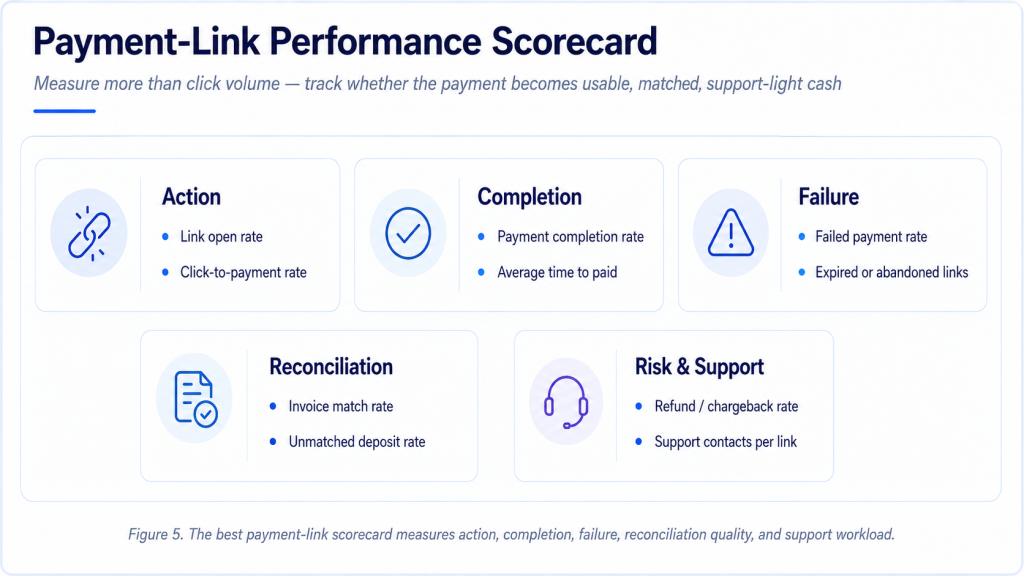
| Metric | Why it matters |
|---|---|
| Link open rate | Shows whether customers are seeing the payment request in email, SMS, invoice, portal, or chat. |
| Click-to-payment rate | Separates interest from completed action and reveals payment-page friction. |
| Payment completion rate | Shows how many link visits become paid invoices, deposits, or balances. |
| Failed payment rate | Identifies card declines, bank failures, authentication problems, expired links, or technical issues. |
| Average time from link sent to payment | Measures whether links shorten the invoice-to-cash cycle. |
| Reminder-to-payment conversion | Shows whether reminder links create action or merely add another message. |
| Payment method after click | Reveals whether customers choose card, ACH, wallet, Pix, UPI, bank transfer, or another method. |
| Mobile completion rate | Tests whether the link experience works on the devices where customers open it. |
| Partial-payment rate | Shows whether links support disputed invoices, installments, and payment plans. |
| Reconciliation match rate | Confirms that payments close the correct invoice, customer, job, or statement. |
| Refund or chargeback rate | Connects link convenience to risk and customer support quality. |
| Customer support contacts per link | Shows whether customers still need help after receiving a payment path. |
A 90-Day Payment Link Improvement Plan
Payment-link improvement should be managed as a practical operating cycle, not a one-time feature launch. The business first needs to know where links are being used, which customers pay through them, which methods work, which channels perform, and where reconciliation breaks. Only then should it expand link usage across invoices, reminders, quotes, QR codes, deposits, and recurring setup.
| Timing | What to do | Output |
|---|---|---|
| Days 1-30 | Map invoice-payment paths, reminder flow, payment methods, link usage, reconciliation quality, and dispute volume. | A clear baseline showing where payment links reduce friction and where work still remains manual. |
| Days 31-60 | Fix high-confidence issues such as weak payment visibility, poor reminder design, outdated balances, reconciliation gaps, and payment-method mismatch. | Controlled improvements with before/after measurements and assigned owners. |
| Days 61-90 | Review adoption, payment completion, dispute reduction, automation gains, reconciliation quality, and customer feedback. | A repeatable payment-link scorecard and roadmap for scaling payment-link programs. |
Planning principle The goal is not to send more links. The goal is to reduce the distance between a valid payment request and usable cash, while keeping enough context for accounting, reporting, customer service, and future follow-up.
Practical Payment Link Scenarios
The easiest way to judge payment links is to place them inside real operating situations. A payment link is not valuable because it exists. It is valuable when it removes the exact piece of friction that keeps a willing customer from paying. That friction looks different for a contractor, an agency, a medical office, a wholesaler, a SaaS company, or a local retailer.
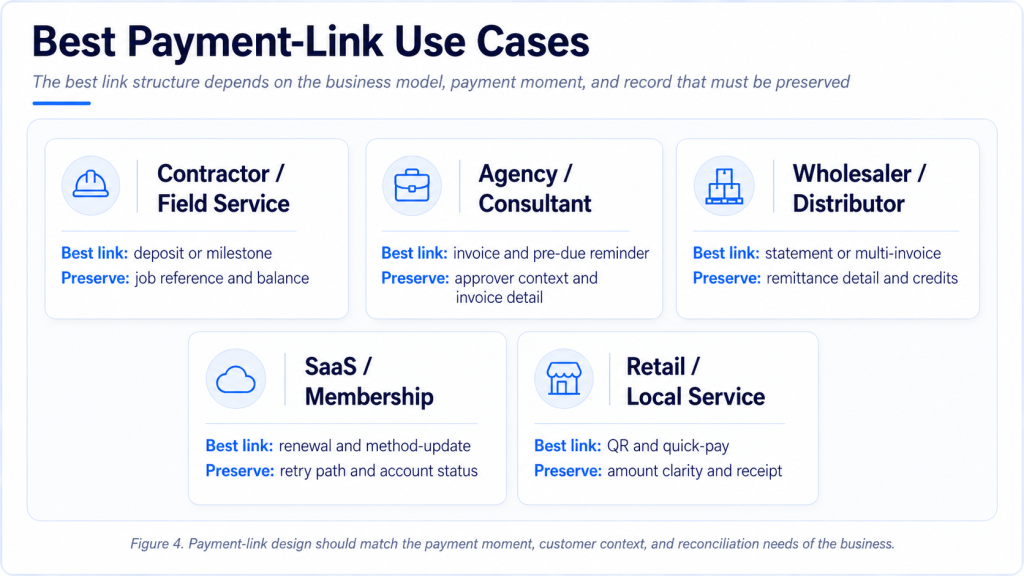
A contractor may need a deposit link immediately after an estimate is accepted. The customer is ready to reserve the work, but the business does not want to start scheduling materials or subcontractors until the deposit is received. In that setting, the link should show the job name, deposit amount, remaining balance, and payment confirmation. If the link is generic, the contractor may receive money but still have to match it manually to the right project.
A professional-services firm may use links differently. The client may receive an invoice after work is delivered and may need time for internal approval. A payment link on the invoice helps only after approval is complete. The more useful workflow is often a pre-due reminder that confirms the invoice is with the right approver, followed by a due-date link that makes payment simple once the client is ready.
A wholesaler or distributor may need statement links more than single-invoice links. Customers may pay several invoices, credits, short shipments, and disputed items together. A link that forces one invoice at a time may create extra reconciliation work. A statement link that lets the customer select balances, attach remittance detail, and pay the open account can be more useful than a faster one-invoice button.
A SaaS or membership business may use payment links for failed renewals and payment-method updates. The problem is not always the original sale; it is a card that expires, a billing contact that changes, or a renewal that fails after the customer still wants the service. In that setting, a payment link should help the customer update the method, retry securely, and restore service without starting a support thread.
A local retailer or event organizer may use QR payment links where customers are physically present. A QR code can support special orders, deposits, class registration, delivery balances, or after-hours payment. The recordkeeping still matters. If every QR payment lands in one generic account with no order reference, the link has moved the money but weakened the operating trail.
A healthcare, education, or appointment-based business may need a different flow. The link may collect a balance after service, a class fee, a missed-appointment charge, or a recurring membership payment. In those cases, the link should make the payer, service date, amount, and refund policy easy to verify because the customer may not remember every detail when the reminder arrives.
An international seller needs the most careful version. A card link that works well in the U.S. may underperform in India if UPI is missing, in Brazil if Pix is absent, in Poland if account-to-account options are expected, or in Europe if bank-transfer and card behavior differ by country. The link may be global, but the payment page behind it should feel local.
| Business situation | Payment-link use | What makes the link work |
|---|---|---|
| Contractor or field service | Deposit or milestone link after estimate approval | Job reference, deposit amount, remaining balance, and confirmation |
| Agency or consultant | Invoice and pre-due reminder links | Approver context, invoice detail, payment route, and professional tone |
| Wholesaler or distributor | Statement and multi-invoice payment links | Invoice selection, credits, remittance detail, and matching |
| SaaS or membership business | Failed-renewal and method-update links | Secure update path, retry logic, and service-status connection |
| Retail, event, or local service | QR and quick payment links | Branding, amount clarity, receipt, and order reference |
When Payment Links Are Not Enough
A payment link is a strong action tool, but it is not a complete collections strategy. Some unpaid invoices are not delayed because payment is inconvenient. They are delayed because the invoice is disputed, the buyer needs a purchase order, the work has not been approved, the customer has a cash-flow problem, the billing contact is wrong, or the account has entered credit-risk territory. In those cases, sending more links can make the business look organized while the real blocker remains untouched.
This is why payment-link reporting should separate link nonuse from link failure. If a customer never opens the link, the business may have a contact, channel, or trust problem. If the customer opens the link but does not click, the payment page may not feel clear or relevant. If the customer clicks but does not pay, the method, authentication, amount, or confidence layer may be weak. If the customer replies with a dispute, the payment link has done its job by revealing that the issue is not payment friction.
Payment links should therefore be paired with status intelligence. An invoice waiting for approval needs a different workflow from an invoice that is forgotten. A disputed invoice needs issue resolution. A repeat slow payer may need revised terms. A customer with a large 60-day balance may need credit review. A customer that tried to pay and failed needs payment support, not a stronger reminder.
• If customers repeatedly ask for invoice copies after receiving links, the business may have a document-delivery or portal visibility problem rather than a payment-method problem.
• If customers click but abandon the payment page, the business should review trust cues, payment methods, mobile layout, fees, and authentication steps.
• If customers pay but the accounting team still has unmatched deposits, the link needs stronger invoice and remittance data.
• If overdue customers ignore every link but respond to account-manager calls, the issue may be relationship ownership or credit discipline rather than technology.
• If payment links are used for disputed balances, the business should show a path to resolve the dispute and pay the undisputed amount.
Operating rule A payment link should shorten the path to payment only after the reason for delay is understood. When the blocker is approval, dispute, documentation, or credit risk, the link must be supported by workflow ownership rather than repeated reminders.
Industry Differences in Payment Link Design
Different industries need different payment-link behavior because the payment moment changes. A restaurant deposit link, a construction milestone link, a healthcare balance link, a consulting invoice link, and a wholesale statement link are all payment links, but they do not carry the same business logic. The most useful design starts with the work being paid for, not with the payment technology.
Project-based industries need links that connect to scope, milestones, change orders, retainage, or deposits. Recurring-service industries need links that support stored authorization, renewal, payment-method update, and failed-payment recovery. Professional services need a balance between ease and relationship tone. Retail and hospitality links need speed, mobile clarity, and receipt confirmation. B2B suppliers need remittance data and account history.
Industry context also affects how strongly a link should be pushed. A low-value retail balance may justify a simple QR code. A high-value B2B invoice may require account-owner involvement, purchase-order detail, and clear remittance fields. A recurring subscription may need an automated update link before the payment fails. A sensitive professional-services invoice may need careful language so the link feels helpful rather than transactional.
| Industry pattern | Payment-link priority | Risk to avoid |
|---|---|---|
| Construction and field service | Deposits, milestones, change orders, and job references | Collecting funds without matching them to the right project stage |
| Professional services | Invoice links with clear context and relationship-safe reminders | Over-automated language that weakens client trust |
| Healthcare, wellness, and appointments | Balance links, deposits, payment plans, and mobile confirmation | Confusing customers about amount, privacy, or responsibility |
| Wholesale and distribution | Statement links, remittance detail, and multi-invoice payment | Fast payment with weak invoice matching |
| Retail, events, and local commerce | QR links, social links, and no-code checkout | Generic links with poor receipt and refund handling |
| SaaS and memberships | Renewal links, method-update links, and retry paths | Losing customers after preventable failed payments |
Payment Links Statistics FAQ
• What is a payment link?
A payment link is a URL or QR destination that takes a customer to a hosted payment page, app flow, invoice balance, or checkout-style payment screen. The method behind the link may be card, wallet, ACH, bank transfer, UPI, Pix, BNPL, or another local method.
• How do payment links help businesses get paid faster?
They reduce the number of steps between the request and payment. Instead of asking the customer to find bank details, log into a portal, mail a check, or call for instructions, the link gives the customer a direct route from invoice, reminder, quote, or message to payment.
• Are payment links useful for invoices?
Yes, especially when the invoice is approved but unpaid because payment is inconvenient or unclear. Links are less effective when the real issue is a dispute, missing purchase order, customer cash shortage, or internal approval delay.
• What payment methods can a payment link support?
Depending on provider and country, a link can support cards, wallets, ACH, open banking, UPI, Pix, bank transfer, BNPL, recurring setup, or local payment methods. The business should choose methods based on customer behavior and reconciliation needs.
• Are payment links safe?
They can be safe when they are branded, generated from trusted systems, tied to invoice details, and sent through consistent channels. Risk rises when links look generic, are manually created, are sent to the wrong contact, or are not connected to a known invoice record.
• How do payment links work with QR codes?
A QR code can encode the payment link. The customer scans the code from a printed invoice, counter display, delivery note, or service message and reaches the payment page or app flow.
• Do payment links reduce late payments?
They can reduce late payment caused by convenience or routing friction. They do not automatically fix disputes, approval delays, weak credit control, or customer cash-flow problems.
• What should businesses track after sending payment links?
The most useful metrics include link open rate, click-to-payment rate, payment completion, failed payment, time to paid, method used, mobile completion, reconciliation match rate, refunds, chargebacks, and support contacts.
• How are payment links different from a payment gateway?
The payment link is the customer-facing route. The gateway or processor is the infrastructure behind the payment page that authorizes, routes, settles, reports, and helps secure the payment.
• What is the biggest mistake businesses make with payment links?
The most common mistake is treating the link as the whole process. A good link should be connected to the invoice, customer, amount, reminder history, payment method, settlement record, and accounting workflow.
Final Takeaway
Payment links are valuable because they turn a payment request into an immediate, trackable action. They are especially useful where invoices, reminders, quotes, deposits, QR codes, and service balances already exist, but the customer still needs a simpler route to pay. The statistics behind unpaid invoices, late payment, reminder channels, mobile behavior, ACH, UPI, Pix, and regional payment rails all point to the same lesson: a link can reduce friction only when it fits the customer’s payment habit and the business’s recordkeeping need.
The strongest payment-link setup does not stop at a pay-now button. It connects the link to the invoice or quote, shows the right amount, supports the right local methods, works cleanly on mobile, confirms payment, prevents duplicate or suspicious requests, and helps the business reconcile the money after settlement. A link that collects funds but creates manual matching work has solved only half the problem.
The most mature use of payment links is not more aggressive chasing. It is better timing and cleaner context. A pre-due link helps confirm that the invoice is ready to pay. A due-date link makes the action easy. A post-due link should reveal whether the problem is convenience, approval, dispute, cash flow, or failed payment. A statement link should simplify several balances at once. A QR link should make in-person payment fast without losing the record.
For business owners, AR teams, and finance leaders, the practical goal is not to send more links. It is to make every payment request easier to act on and easier to understand afterward. When payment links are tied to reminders, invoices, statements, regional rails, and accounting records, they become more than a convenience feature. They become part of a cleaner invoice-to-cash system.